
Cognos Analytics 12.1.3 New, Changed and Fixed
Contents
- Bring your Own LLM
- Reporting Changes
- Dashboard Selection Router
- Dashboard Notes
- Layouts Sets
- Data Modules get some Serious Attention
- Data Module Source Management
- Native Git Source Control
- New Deployment REST APIs
- Repeatedly Failing Schedules
- S3, OIDC and other Administration Improvements
- Certified Container Improvements
- Should I Upgrade? Final Thoughts
At a glance
IBM Cognos Analytics 12.1.3 is the June 2026 release in the 12.1.x family. IBM’s own announcement focuses heavily on bringing Agentic AI into the governed Cognos environment, but there are also significant enhancements across reporting, dashboards, modelling and administration.
- Agentic AI and natural-language report generation
- Data Query Agent
- Report Authoring Agent
- Model Context Protocol (MCP) integration
- Bring Your Own LLM support in applicable deployments
- New dashboard Selection Router functionality
- Dashboard notes and collaboration features
- Layout Sets
- Markdown report output
- Expandable and collapsible crosstabs
- Faster master-detail report processing
- Native source-control integration
- New deployment REST APIs
- Automatic disabling of repeatedly failing schedules
- Improved multi-cube data module support
- Better stored procedure support
- New governance controls over data-module sources
- S3 support for bursting and archiving
- Numerous OIDC, reporting, dashboard, modelling and platform fixes
Agentic AI
The most significant strategic change in 12.1.3 is the expansion of the Cognos AI architecture. There is a massive caveat, particularly for self-hosted customers – Agentic AI is an additional component, which means that it needs additional installation, entitlement and configuration. It also uses watsonx.ai, therefore a watsonx.ai account is required to utilise the agentic AI features of Cognos Analytics 12.1.3. For Cloud On-Demand customers, you must have a paid Premium subscription to use the Agentic AI features.
Previous Cognos releases had already introduced conversational interaction through the Assistant, but 12.1.3 takes a much more agent-oriented approach, with four major elements: the Data Query Agent, Report Authoring Agent, governed AI workflows and Model Context Protocol (MCP) integration.
Data Query Agent
The Data Query Agent, initially described by IBM as a preview capability, is designed to answer natural-language questions against governed Cognos business data.
The important word there is governed.
Rather than allowing an AI model to rummage directly through the underlying database, Cognos continues to sit between the AI and the data. Existing metadata, security, business terminology and data access rules remain part of the process.
That is potentially a big differentiator for organisations that like the productivity benefits of generative AI but get distinctly uneasy when someone proposes pointing an LLM directly at their finance database.
Report Authoring Agent
Possibly the most immediately useful AI enhancement is natural-language report creation.
As of 12.1.3, users can describe the report they want in natural language and Cognos can generate an entire report. For example, a user could ask for a report showing revenue by region with a year-on-year comparison and a summary KPI, rather than manually creating each component.
However, OLAP and DMR sources are not supported by this functionality. The source must also be enabled for AI and the user needs appropriate report authoring permissions
Multilingual Agentic AI
IBM has also broadened language support. From 12.1.3, the Agentic AI interface can be used in several languages rather than being restricted to English.
That matters for multinational Cognos environments where English-only AI interfaces can otherwise become an adoption barrier.
Model Context Protocol support
Another particularly interesting addition is support for MCP, the Model Context Protocol.
MCP allows Cognos functionality and governed Cognos information to be exposed as tools that other AI systems can interact with.
This as a route for integrating Cognos with AI assistants and orchestration platforms such as Watson Orchestrate, Microsoft Copilot, Claude and custom AI applications.
IBM’s 12.1.3 download documentation also lists a separate IBM Cognos Analytics MCP Server package alongside the AI Premium components.
This could ultimately prove more significant than the chatbot itself. Rather than requiring users to visit Cognos to ask Cognos a question, another AI application could potentially invoke governed Cognos capabilities as part of a wider business process.
That starts to turn Cognos from merely a destination into a governed analytics service for other AI systems
Bring Your Own LLM
IBM is also loosening the relationship between Cognos AI and the underlying language model.
For Cognos Analytics Certified Containers with Agentic AI, 12.1.3 introduces Bring Your Own LLM support using a LiteLLM proxy. Organisations can connect supported external LLM providers through an OpenAI-compatible interface and potentially use different models depending upon their requirements.
This is potentially important for customers with:
- Corporate AI standards
- Existing enterprise LLM agreements
- Data residency requirements
- Private or self-hosted models
- Cost controls
- Restrictions on specific public AI providers
Rather than Cognos dictating the model, Cognos increasingly becomes the governed analytics layer sitting above it.
Reporting changes
If you strip away the AI announcements, some of the most useful day-to-day improvements in 12.1.3 are in traditional Cognos Reporting.
Expand and collapse crosstab hierarchies
Crosstabs can now provide interactive hierarchy expansion and collapse. Users can expand or collapse row members to navigate hierarchical information without repeatedly rerunning the report. This interaction is handled client-side once hierarchy expansion is enabled. It makes a standard Cognos crosstab behave more like the interactive analytical reports many users expect today.
Faster master-detail reports
Traditionally, a report containing large numbers of master-detail relationships may execute detail queries sequentially. 12.1.3 has introduced the capability to execute multiple detail queries concurrently.
IBM reports performance improvements of as much as seven to eight times in some scenarios, although this functionality is not simply switched on globally by upgrading. Administrators need to enable and configure concurrent detail execution using Report Server advanced configuration settings.
Markdown output
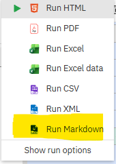
Cognos Reporting can now render reports directly as Markdown.
Markdown joins the established HTML, PDF, Excel, CSV and XML output formats and is clearly designed partly with modern documentation and AI workflows in mind.
Markdown output can be produced interactively and through background execution, schedules and jobs. It is especially easy for:
- AI systems to consume
- Knowledge-management platforms to ingest
- Developers to process
- Documentation systems to render
- Automated workflows to transform
There are limitations. Complex report formatting cannot be reproduced perfectly, prompts are not interactive in the generated Markdown and functionality such as drill-through is naturally lost. But for transforming Cognos output into machine-friendly structured text, it is a welcome addition.
Other reporting improvements
There are also improvements to relative-date filtering, custom tooltips, master-detail batch reporting and crosstab interaction.
Dashboard Selection Router
The Selection Router lets dashboard widgets manipulate parameters that can then influence other parts of the dashboard.
That means dashboard interactions can now be used for things such as:
- Switching measures dynamically
- Applying common selections across multiple visualisations
- Controlling calculations
- Passing technical parameter values while displaying friendly descriptions
- Using buttons or text widgets as selectors
- Creating interactions across dashboard tabs
Behind the scenes, those buttons could alter a parameter used by several calculations and visualisations simultaneously.
The Selection Router makes dashboards feel much more like genuine analytical applications rather than collections of loosely connected charts. Undo and redo support is also included.
Dashboard notes
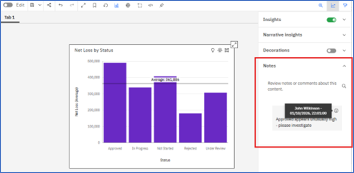
Cognos Analytics 12.1.3 also introduces notes on dashboard visualisations. Users can attach contextual information directly to visualisations, providing a lightweight collaboration mechanism inside the dashboard itself.
Notes can include author and timestamp information, can be edited by their creator and can be searched by content or author, and are saved with the dashboard.
Layout Sets
IBM has also introduced Layout Sets for Cognos dashboards, describing the concept as “One Dashboard. Multiple Perspectives”.
The idea is to give dashboard authors greater flexibility in how dashboard content can be arranged and presented without creating entirely separate dashboard assets for every perspective. It is another step towards making dashboards more application-like and adaptable.
Data modules get some serious attention
Data modules continue to become more capable with every Cognos release, and 12.1.3 moves them further towards being a genuine replacement for Framework Manager in a wider range of scenarios.
Multiple-cube support
Support for scenarios involving multiple cubes has been improved. This matters particularly for Planning Analytics and other OLAP environments where modelling across more than one cube has historically exposed limitations that customers using relational sources rarely encounter.
Stored procedures
Stored procedure support within data modules has also been enhanced. Stored procedures have long been an awkward corner of modern Cognos modelling compared with traditional Framework Manager packages, so greater support here removes another reason for some customers to retain older modelling approaches.
Better hierarchical filtering
IBM has made improvements to hierarchical filter behaviour, again particularly relevant to cube-based and dimensional sources.
Data Module source management
12.1.3 introduces two new administration capabilities:
- Use Data Module Source: Data Set
- Use Data Module Source: Data Module
These allow administrators to control whether users are permitted to create new data modules using data sets or existing data modules as their sources. It sounds small, but it solves a genuine governance problem.
Native Git source control
This is one of the most significant additions for mature Cognos development teams. Cognos 12.1.3 introduces integration between Cognos assets and external Git repositories.
Assets can be versioned so teams can:
- Track changes
- Maintain historical versions
- Collaborate through established development processes
- Audit changes
- Restore previous asset versions
- Maintain external backups of Cognos content
IBM’s detailed documentation describes support for assets including reports, report templates, queries, packages, data sets, dashboards, explorations, stories, data modules and Jupyter notebooks.
This addresses something Cognos developers have wanted for years. Deployment archives are useful for moving content around, but they have never been a particularly elegant substitute for proper source control.
GitHub, GitLab and Azure DevOps: one detail to watch
There is currently a slight discrepancy in IBM’s documentation. IBM’s 12.1.3 announcement explicitly mentions native version control with GitHub, GitLab and Azure DevOps. However, IBM’s detailed source-control documentation currently states support for GitHub and GitLab.
If Azure DevOps is central to your development strategy, verify support against your exact Cognos build and IBM documentation before designing a process around it.
NOTE: In 12.1.3, source control cannot yet restore Cognos content that has been deleted from Cognos. IBM explicitly says this capability is planned for a future release.
New deployment REST APIs
A new set of REST APIs for deployment management has been introduced.
12.1.3 provides API operations for tasks including:
- Retrieving deployment information
- Retrieving archive information
- Starting exports
- Starting imports
- Updating deployments
- Downloading deployment archives
- Uploading archives
IBM documents seven deployment-related REST endpoints. (IBM deployment API documentation)
This is important because it allows deployment operations to become part of repeatable automated pipelines rather than relying entirely on somebody clicking around the Administration console. Combined with Git source control, this makes 12.1.3 a notable release for organisations trying to bring Cognos development into more modern DevOps practices.
Repeatedly failing schedules
This one may quietly save Cognos administrators a lot of pain. Cognos 12.1.3 can automatically disable schedules that repeatedly fail.
Administrators can configure a threshold between 1 and 100 consecutive failures. A value of zero disables the feature. Once the threshold is reached, Cognos disables the schedule and can notify the owner by email. Disabled schedules appear in a dedicated Auto-Disabled view within My Activities and Schedules.
For busy environments containing thousands of schedules, this is a genuinely useful operational improvement.
S3, OIDC and other administration improvements
There is now updated OIDC support, report specification change tracking, S3 support for report bursting and archiving, improved deployment automation and native source control.
S3 support is particularly useful as Cognos deployments increasingly move away from traditional shared Windows or Unix file systems. The report-specification tracking enhancements also complement the new source-control functionality.
Certified Container improvements
Customers using Cognos Analytics Certified Containers receive some additional 12.1.3 capabilities.
Alongside Bring Your Own LLM through LiteLLM there is now support for using an external OpenSearch deployment instead of the built-in implementation. IBM recommends the external option for appropriate production deployments where organisations want greater control over scalability and search infrastructure.
These capabilities are deployment-specific and should not be interpreted as being automatically available to every traditional on-premises Cognos installation.
Should I upgrade? Final thoughts
12.1.3 is one of the more interesting Cognos releases in recent years.
If you ignore the AI marketing for a moment, there is a strong collection of practical enhancements.
- For report developers, expandable crosstabs, Markdown output and master-detail performance improvements are immediately useful.
- For dashboard developers, the Selection Router significantly increases what can be built without resorting to custom solutions.
- For administrators, automatic schedule disabling is simple but potentially extremely valuable.
- For development teams, Git source control and REST-based deployment automation finally begin to address some long-standing weaknesses in Cognos lifecycle management.
- Strategically, MCP and the Agentic AI architecture hint at Cognos becoming a governed analytics provider that can participate inside external AI workflows rather than requiring every interaction to start inside the Cognos user interface.
If you are already planning the move into the 12.1.x generation, 12.1.3 FP1 is a noticeable leap forward from 12.0.x or earlier. For existing 12.1.x users, there is enough to justify the upgrade, given that there are also 66 defect corrections in 12.1.3 and 12.1.3 FP1 release.